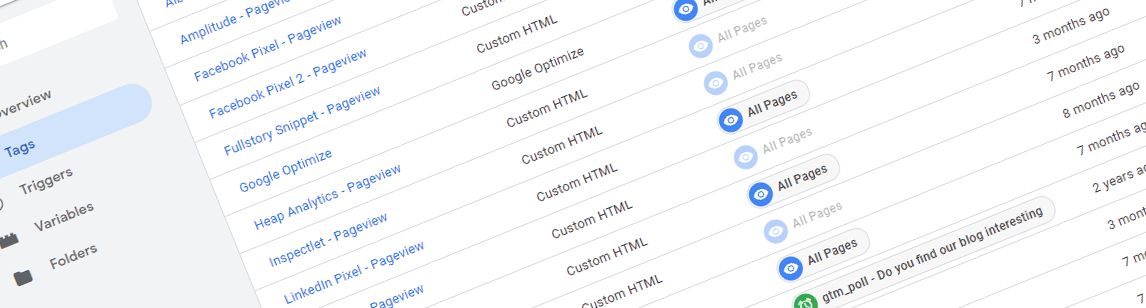
Let’s be honest, most companies don’t really think about nomenclature when it comes to setting up their tags, goals or A/B testing experiments. And that creates a horrible mess that will steal your teams valuable time and makes sure no-one really knows what’s going on.
At Reflective Data, when we start working with a new client, we always start by figuring out what their current system consists of — and in many cases, it’s a real headache. Not to mention, when we ask the client about a specific tag or goal that they set up 6 months ago, they don’t remember anything — and the name they chose isn’t helping much either.

For several clients, we’ve really pushed the need for getting a proper naming structure across the company. And while it hasn’t always been easy, we’ve managed to fix it for almost all of them. And according to our clients, the new naming conventions made their work so much more effective.
Renaming everything is one thing but, unfortunately, it won’t provide a long-term solution. What’s needed is nomenclature guidelines and educating the team on how to use them, and the importance of it.
Some (bad) real-life examples from Google Tag Manager that we’ve seen recently:
All from a single setup with over 170 tags
- Sending Google Pay click event
- jquery-scrolldepth
- UA event tracking for checkout
- Hotjar for blog
- Live chat widget
- Conversion tag
Now, if your tag manager has 10 tags you could probably get away with names like this. But when you start adding more tags and/or if more than one person is working with the setup, things start getting messy.
So, how should you name your tags? Let’s start by how we renamed the very same tags.
- GA – Event – Click – Google Pay
- JS – Event – Scroll Depth
- GA – Event – Clicks – Checkout
- HJ – Main Snippet – Blog
- Olark – Main Snippet
- AdWords – Conversion – Purchase
There are several ways how you could approach naming your tags (or anything else) but we generally like the space-dash-space method. The key is to pick one and stick to it. Of course, formatting alone just the facade.
Here are a few guidelines that will hopefully help you a bit further:
1. Always have a documentation
So you are working on a new nomenclature for your business. That’s great, but not everyone might understand things the way you do. Even if they look at a few examples they might come up with something totally different. That is why you must have documentation for explaining it.
2. Educate your team
This goes with the previous point. You need to inform your people about the new nomenclature and explain to them how it works and why it’s really important. You must also make sure everyone is actually following the new rules and friendly remind them every time they don’t. Trust me, in the beginning, you will have to do it guide often.
3. Keep your names short
Include as little as possible but as much as needed. It is okay to use shortenings and acronyms (you should include them in the docs, though) and lose the words that are not absolutely needed.
4. Consistency is really important
Make a plan and stick to it. If you are using an acronym, always use the same acronym. Don’t change the order of the elements in your names.
- GA – Event – Click – Add to Cart
- GA – Event – Scroll Depth
- Event – Blog Comment – GA
- UA – Mobile menu click
5. Add some context
Make sure people looking at your names would understand what they are, what are they doing and where are they doing it. For Google Analytics events, you might want to have “GA” and “Event” in your name, followed by what kind of event it is and on which pages this event is coming from.
I hope these you find these guidelines helpful and they get you a step closer to having proper naming conventions at your company, too.
As a bonus, I’ve added some examples that I think are pretty good. Divided by where they’re used.
Google Tag Manager Triggers
- PV – Homepage (PV stands for page view)
- Click – Outbound Link
- CE – VWO – Data Push (CE stands for custom event)
Google Tag Manager Variables
- VWO – Experiment ID
- EC – Transaction ID (EC stands for enhanced ecommerce)
Google Analytics Goals
- Click – Complete Purchase
- PV – Newsletter Signup Complete (PV stands for page view)
- Event – Submit Comment – Blog
A/B Testing Experiments
- RD – Homepage – Benefits Bar – Desktop (RD means this test was built by Reflective Data)
- Sitewide – Change Main Menu Order – Desktop & Mobile
Do you have any further ideas for improving analytics nomenclature? Share them in the comments below!
your blog is awesome and thanks for posting such a wonderful article. This is some great information!
Thanks for the great post. I think this is also a great idea for another piece of content like a guide or cheat-sheet.
Wow I am really glad someone finally decided to write about it. Our company has some real issues with legacy tags back when we didn’t have any rules for naming stuff. And even today, several people just don’t see the importance of it.